
Simulator Overview
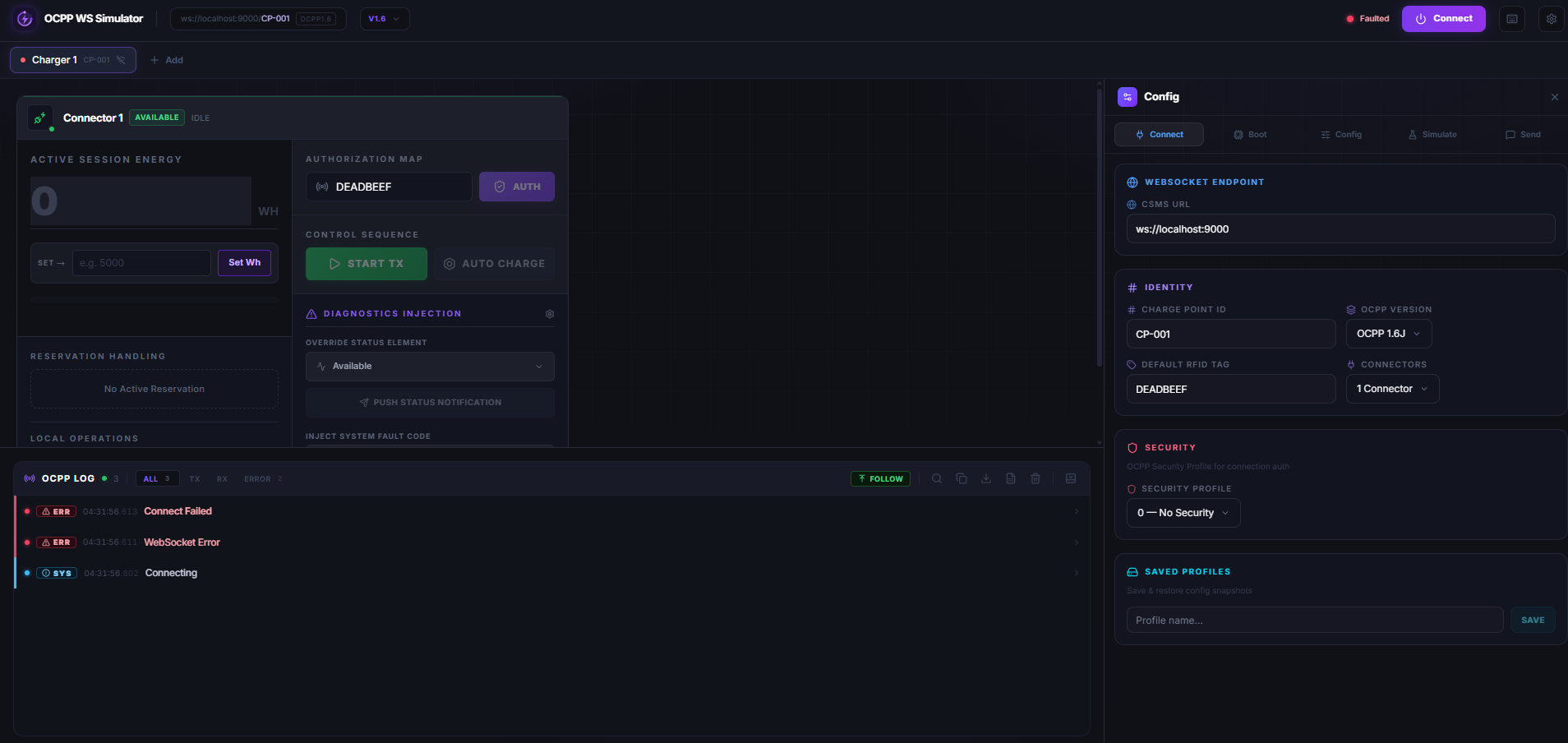
A fully browser-native OCPP charge point simulator built on top of ocpp-ws-io — no installs, no backend required.
The simulator is part of the ocpp-ws-io monorepo and lives in
apps/simulator. It runs as a standalone Next.js app and talks directly to
any OCPP-compliant Central System over WebSocket — no proxy or backend needed.
Live demo: Try the simulator now at ocpp.rohittiwari.me — no install required.
What Is It?
The OCPP Simulator is a visual, zero-install charge point emulator that runs entirely in the browser. It uses the BrowserOCPPClient from ocpp-ws-io/browser to establish real WebSocket connections to a Central System (CSMS) and emulate the full OCPP message lifecycle — from BootNotification all the way through StartTransaction, MeterValues, and StopTransaction.
It supports OCPP 1.6, 2.0.1, and 2.1 and is designed for:
- Development — test your CSMS handlers without real hardware
- Integration testing — reproduce edge cases and race conditions
- Protocol exploration — inspect raw OCPP frames in real time
Architecture
| Layer | Technology | Role |
|---|---|---|
| UI | Next.js + React | Renders panels, controls, logs |
| State | Zustand (persisted) | Charger config, runtime state, logs |
| Transport | BrowserOCPPClient | WebSocket RPC to the CSMS |
| Protocol | OCPP 1.6 / 2.0.1 / 2.1 | Message framing and type safety |
Key Features
🔌 Multi-Charger
Simulate multiple charge points simultaneously, each with its own WebSocket connection, config, and log stream.
📋 OCPP 1.6 + 2.x
Full message coverage for OCPP 1.6. OCPP 2.0.1 and 2.1 handler support with Device Model and EVSE management.
📡 Live Log Panel
Real-time OCPP frame viewer with direction filtering (Tx/Rx/Error), search, JSON/CSV export, and collapsible payloads.
⚙️ Config Panel
Edit charge point config live — endpoint, identity, OCPP version, security profile, connectors, boot notification fields, and more.
⌨️ Keyboard Shortcuts
Full shortcut suite for power users: toggle panels, connect/disconnect, new charger, and export logs without touching the mouse.
💾 Persistent State
Config, profiles, and panel layout are persisted to localStorage — your setup survives page refreshes.
OCPP Version Support
| Feature | OCPP 1.6 | OCPP 2.0.1 | OCPP 2.1 |
|---|---|---|---|
| BootNotification | ✅ | ✅ | ✅ |
| Heartbeat | ✅ | ✅ | ✅ |
| StatusNotification | ✅ | ✅ | ✅ |
| Authorize | ✅ | ✅ | ✅ |
| StartTransaction | ✅ | ✅ (TransactionEvent) | ✅ |
| StopTransaction | ✅ | ✅ (TransactionEvent) | ✅ |
| MeterValues | ✅ | ✅ | ✅ |
| RemoteStart/Stop | ✅ | ✅ | ✅ |
| Reset / ChangeAvailability | ✅ | ✅ | ✅ |
| GetVariables / SetVariables | — | ✅ | ✅ |
| Device Model (UI) | — | ✅ | ✅ |
| Security Profile 0 (None) | ✅ | ✅ | ✅ |
| Security Profile 1 (Basic Auth) | ✅ | ✅ | ✅ |
| Security Profile 2/3 (TLS) | ❌ Browser limitation | ❌ | ❌ |
TLS-based security profiles (2 and 3) require client certificate handling that
is not available in browser WebSocket APIs. Use the Node.js OCPPClient for
mTLS scenarios.